Analytics
Risk analysis
Clients rarely cancel outright. They just quietly stop coming — one session gets moved, then two, then nobody replies at all. Risk analysis looks for exactly this pattern in your own data and hands it to you as a list, while there's still something to save.
You'll find it in the sidebar under Risk analysis. One thing worth saying up front: what's shown there is a calculation, not a verdict. The score doesn't know about last week's conversation or the broken foot. It's a pointer to where you might want to look — no more, no less.
How the score is built
Once a day, TrainerFoundry works out eight factors for every client. Each factor that applies gets a value from 0 to 100 and a fixed weight; the weighted values are added up and capped at 100. A factor that doesn't apply doesn't show up at all — which is why an unremarkable client has an empty factor list and a score of 0.
- No recent sessions 30%
The last completed session was more than 7 days ago — the longer, the higher, maxing out past 60 days. Someone who has never trained with you at all falls under this after 14 days. - Session frequency declined 30%
The last four weeks compared with the four before that. Fires past a 20% drop, maxes out past an 80% drop. Needs at least four completed sessions as a baseline. - High cancellation rate 25%
More than 15% of sessions cancelled in the last 90 days. - Payment issues 25%
A failed membership charge counts in full; an overdue open payment request counts a bit less. Only ever this client's own payments to you. - Package not renewed 20%
The client used to have a package but has none now. The longer that's been the case, the more it weighs. Someone who never bought one, or who holds a running unlimited membership, is left out. - No upcoming bookings 15%
Not a single session on the calendar ahead — for someone who has trained with you before. - Unused package sessions 15%
Paid credit is sitting there with nothing booked against it. The older the purchase and the more sessions still open, the higher. - Reduced engagement 15%
The long view: the last twelve weeks against the twelve before that, past a 40% drop. Catches the slow fade the four-week comparison misses.
The total score then decides the level:
- Low 0-29 — Nothing to do.
- Medium 30-59 — Keep an eye on it. A call wouldn't hurt.
- High 60-79 — Act now — something is slipping right now.
- Critical 80+ — Probably already gone if you do nothing.
The trend next to it compares today's score with the one from 30 days ago: Increasing, Stable or Decreasing. It's often more telling than the score itself — a client at 45 with an Increasing trend needs your attention more urgently than one at 55 who's already Decreasing.
The overview
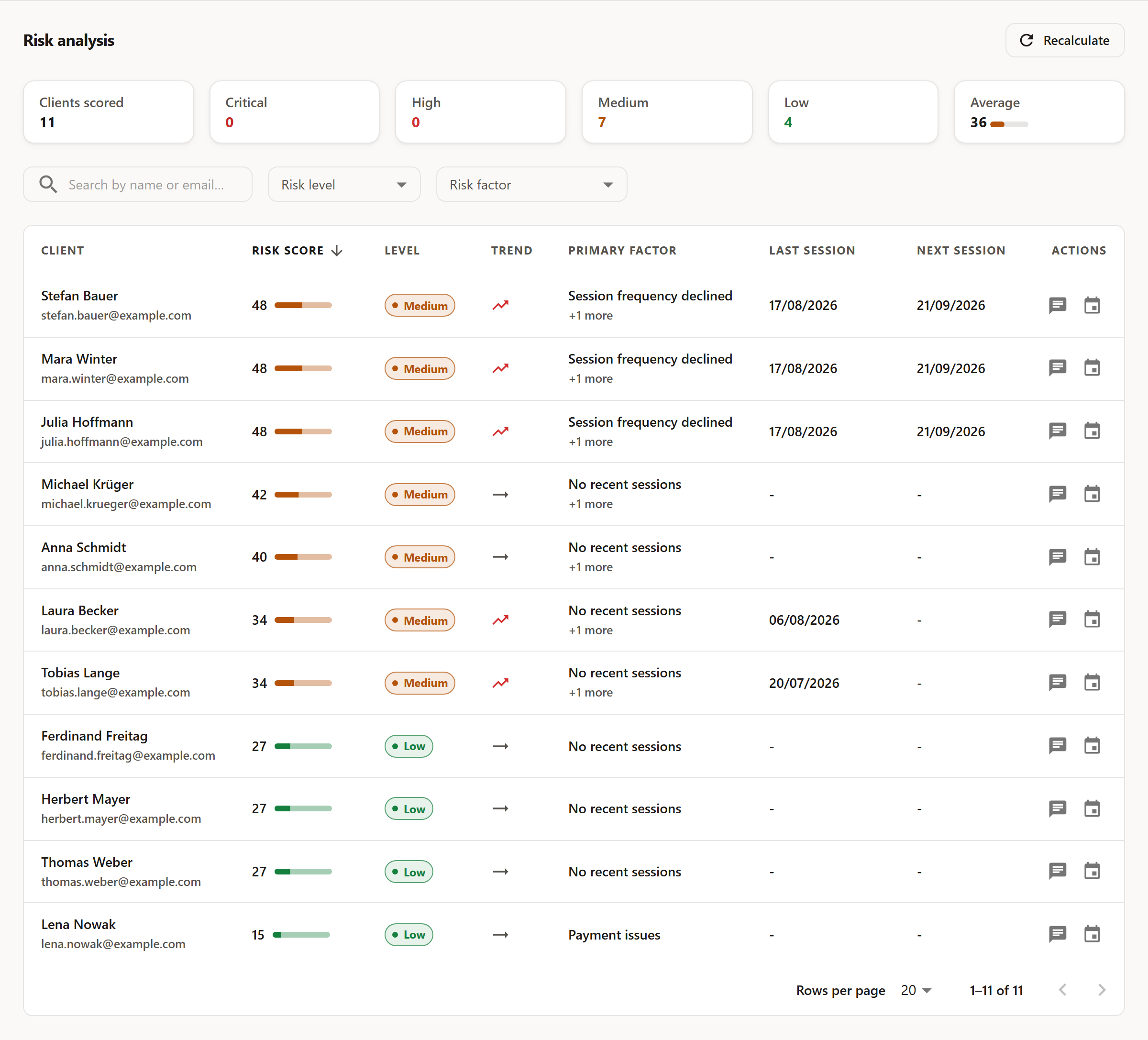
The six tiles up top show the split across the four levels and the average of every score. The first tile, Clients scored, is the sum of the four level tiles beside it — every client with a score, Low included. How many of those genuinely deserve a look is what the four tiles themselves tell you.
The table lists, per client, the score, level, trend and the primary factor — the heaviest-weighing reason. When there's more than one, "+n more" sits underneath. Sort by clicking a column header; filter above it by free-text search on name or email, a level, or a specific factor. The factor filter is the most useful of the lot: "show me everyone with unused package sessions" is a whole afternoon's worklist in one click.
Two shortcuts sit on the right of every row: Send message and Schedule session — so noticing something turns into doing something about it in the same minute.
The detail view
Clicking a row opens a panel on the right with the full reasoning behind the score.
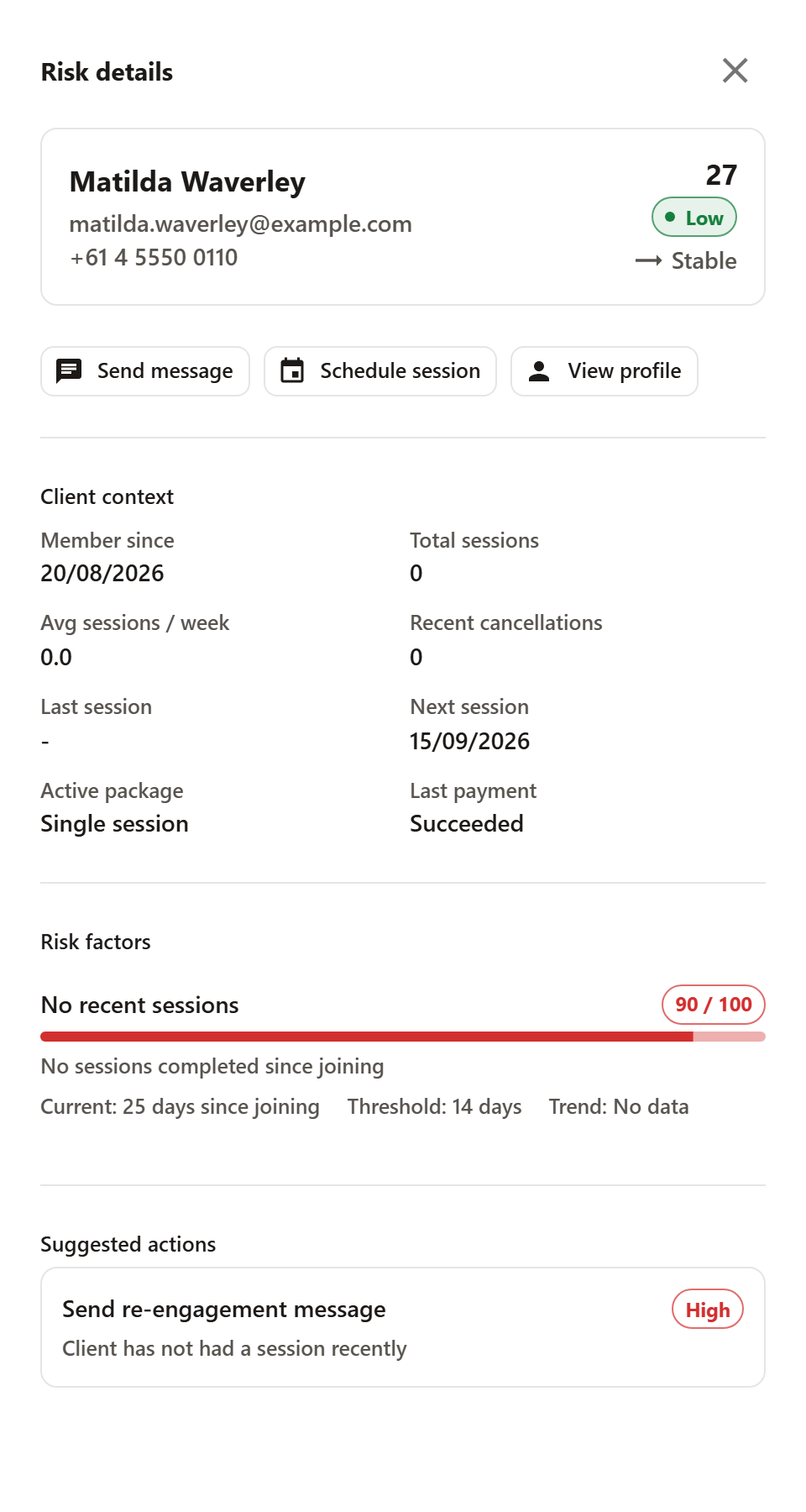
The client context answers the questions you'd ask right after seeing a score: member since when, how many sessions in total, how many per week on average, how many recent cancellations, when they last trained, when they're next booked, which package is running, and how their last payment went.
Below that sits every triggered risk factor with its own value from 0 to 100, the measured value, and the threshold it took to fire. This is where the score earns its keep, or doesn't: "no sessions completed since joining, past the 14-day threshold" is a checkable claim you can agree or disagree with.
At the end of the panel sit the suggested actions. They're derived from whichever factors triggered and carry a priority from Low to High — obvious-sounding suggestions like calling, offering a session, or bringing up a package. Your own read on the person always beats them.
Recalculating
Scores recalculate automatically once a day. The Recalculate button top right triggers it immediately and then reports how many clients were re-scored. Handy right after a bigger change — say, you've just logged or completed a batch of sessions and don't want to wait until the next day.
A note on expectations: this list is worth a look once a week, not once a day. The factors work over windows of four to twenty-four weeks — overnight, very little moves. Making it a Monday-morning habit gets you the most out of it.